


Thursday, February 17, 2011
AT&T offering free 1000 rollover minutes
On the heals of the Verizon iPhone release, AT&T is doing everything they can to keep customers happy! I found this a few days ago and didn't believe it, but it works!! Simply text "yes" to 11113020 and you will receive a text back from AT&T confirming they are processing your free 1000 rollover minutes.


Wednesday, February 16, 2011
AT&T vs Verizon iPhone...Apple's Comparison
It appears Apple snuck out a comparison chart last week of the difference between each companies iPhones. The biggest reason for needing changes is because each utilize a sufferer type of network. This is not just AT&T vs Verizon, it is GSM vs CDMA. A different radio is needed for each of these to work. Below is the link to the chart.
Apple Comparison of iPhones
Google Calendar and your iOS device
Although competitors, Apple and Google have been very cooperative and have not isolated each others consumer base when it comes to their services. In the past it wasn't the easiest to marry your Goolge service to your iOS device, but it has come a long way. If any of you utilize a Google account (contacts, email and calendar) below is an article from google that will help you integrate your google calendar with your iPhone or iPad. If you have any questions, feel free to comment.
One very important piece of information, if you utilize more than one google calendar, you must go the route of CalDAV and not Exchange. You can use one Exchange account for a calendar, but any other calendars must be setup via CalDAV.
Google Calendar setup via Exchange
Google Calendar setup via CalDAV
One very important piece of information, if you utilize more than one google calendar, you must go the route of CalDAV and not Exchange. You can use one Exchange account for a calendar, but any other calendars must be setup via CalDAV.
Google Calendar setup via Exchange
Google Calendar setup via CalDAV
Golf Industry Show 2011 Orlando
I wanted to say thank you to all I met last week during the Orlando Golf Industry Show. Although I do have Analytics to track my blog traffic, I was taken back by the amount of Superintendents in the industry and who attended the GIS show that regularly follow the blog! Thank you! Wednesday night was fantastic and a big thank you to @JohnKaminski and @Aquatrols for getting our Tweetup together. I have heard some rumblings for the tweetup next year, could be trouble!!
Many of you may know that myself and Bob Porter, fellow Superintendent, conducted an iphone/ipad talk at the Tech booth during GIS. Following the presentation, several people continued conversations with us and exchanged information. I personally gave some other talks on utilizing iPhoto and iMovie as well as conducted a Q&A on integrating some of the fantastic tools we have available to us now. I too, had several follow up conversations and exchanged contact information. Well, the emails and phone calls have started coming in, and we are glad to help. I will begin posting some answers to some common questions as well as posting some information I fell appropriate, for any of you after the show that ran out and got an iphone or ipad.
Again, thank you all for following and it was great meeting some of you!
Many of you may know that myself and Bob Porter, fellow Superintendent, conducted an iphone/ipad talk at the Tech booth during GIS. Following the presentation, several people continued conversations with us and exchanged information. I personally gave some other talks on utilizing iPhoto and iMovie as well as conducted a Q&A on integrating some of the fantastic tools we have available to us now. I too, had several follow up conversations and exchanged contact information. Well, the emails and phone calls have started coming in, and we are glad to help. I will begin posting some answers to some common questions as well as posting some information I fell appropriate, for any of you after the show that ran out and got an iphone or ipad.
Again, thank you all for following and it was great meeting some of you!
Saturday, February 5, 2011
Dolly Drive- Cloud Storage for Time Machine
I was scanning thru all the new Apple, iPad, iPhone wears from Macworld 2011and came across a article about Dolly Drive. After seeing the words "Cloud Storage for Time Machine" I had to read on.
Dolly Drive was debuted at Macworld 2011. This service offers Cloud Storage backup for MacOSx Time Machine. Dolly Drive was designed for and is exclusive to Time machine. The software takes over the management of Time Machine backups. Dolly Drive one ups the current Time Machine software by providing an Inclusion Assistant to help you decide what files are to be backed up.
In addition Dolly Drive can also create a bootable clone of your hard drive to an external hard drive. This clone is not stored on the cloud. So, while having the cloud back up you now also can have a bootable drive in case of an emergency.

Dolly Drive was debuted at Macworld 2011. This service offers Cloud Storage backup for MacOSx Time Machine. Dolly Drive was designed for and is exclusive to Time machine. The software takes over the management of Time Machine backups. Dolly Drive one ups the current Time Machine software by providing an Inclusion Assistant to help you decide what files are to be backed up.
In addition Dolly Drive can also create a bootable clone of your hard drive to an external hard drive. This clone is not stored on the cloud. So, while having the cloud back up you now also can have a bootable drive in case of an emergency.

The service is also secure. Their website states "By default Dolly Drive authenticates your sessions starting with your credentials. The Dolly Drive app also encrypts all data from the moment you use the app."
Data Transmission over secure tunnel.
Dolly Drive transmits all data through a secure Tunnel. In simple terms, your data travels from your computer through a virtual “tunnel” across the internet to Dolly Drive’s cloud centers. The data is scrambled during transmission, ensuring that it cannot be viewed or accessed by outside eyes. The entire data transfer is completely safe, so you can feel free to relax when you see Dolly in action. Your data is being sent as safely as possible. (taken from DollyDrive site)
In a couple days I am traveling for 2wks. I will be attending GIS 2011 and then on to my parents for a week. So, I thought I would try the service out. I installed the Doll Drive app on my 2010 MacBook Air. It took about 20min or so to perform the backup. I currently have about 60GB on my Air hard drive. It took about the same time to create the clone drive. I am going to try the service for at least a month and see how it works,
This service seemed like a perfect fit for any traveler and/or MacBook user. The freedom to not really have to carry an external hard drive and plug it in for a Time Machine backup. I use a couple flash drives for extra storage, so I don't want to carry around a hard drive. Now anytime I am connected to the internet Dolly Drive can be backing me up.
Here are the costs
Quick Start
Not sure how much storage you need? 250 gigabytes is perfect for getting started and having plenty of room to grow. Plus we add 5 GBs each month free - the equivalent of 1200 new songs. (Trust us, that's a lot of storage!). For most people, this will keep you plenty covered.
$10 per month 250Gb + Reward
Custom Choice
Know exactly how much you need? Choose exactly how much storage you know you need. Add on later if you want. With 5 GB reward every month, your digital life might get bigger, but your monthly cost shouldn't.
$5.00 per month 50GB + Reward
$7.50 per month 100GB + Reward
Friday, February 4, 2011
Update GIS 2011 iPhone App
If you haven't downloaded the GIS 2011 iPhone App....DO IT NOW! The beauty of this app is that every time you open the app, it will update itself. This morning I opened the app for the first time in about a week and there were plenty of fantastic updates.
Under the "More" tab at the bottom, they have added "Local Places" This gives a categorical list of entertainment and food from Steakhouses to Comedy Clubs! GREAT addition!
Under the same menu (More), they have also listed "Downloads". You will have the ability to download information from vendors during the trade show directly from your phone. These docs will go to your downloads folder. No more carrying around 10lbs worth of paper.
One other great feature is the "Friends" section. This seems to work somewhat similar to Twitter/Bump combined. When you meet a fellow colleague, open this app to the "Friends" portion and hit the plus button. When doing so a menu will slide from the bottom. Select "Request a Code" This will provide you with a 6 digit pin to give to your colleague. You can now follow what your "friend" is doing during the show.
The Maps section is also slowly adding new features as well.
Under the "More" tab at the bottom, they have added "Local Places" This gives a categorical list of entertainment and food from Steakhouses to Comedy Clubs! GREAT addition!
Under the same menu (More), they have also listed "Downloads". You will have the ability to download information from vendors during the trade show directly from your phone. These docs will go to your downloads folder. No more carrying around 10lbs worth of paper.
One other great feature is the "Friends" section. This seems to work somewhat similar to Twitter/Bump combined. When you meet a fellow colleague, open this app to the "Friends" portion and hit the plus button. When doing so a menu will slide from the bottom. Select "Request a Code" This will provide you with a 6 digit pin to give to your colleague. You can now follow what your "friend" is doing during the show.
The Maps section is also slowly adding new features as well.
Tuesday, February 1, 2011
Quickoffice Teases Additional Document Sharing Services for iPad
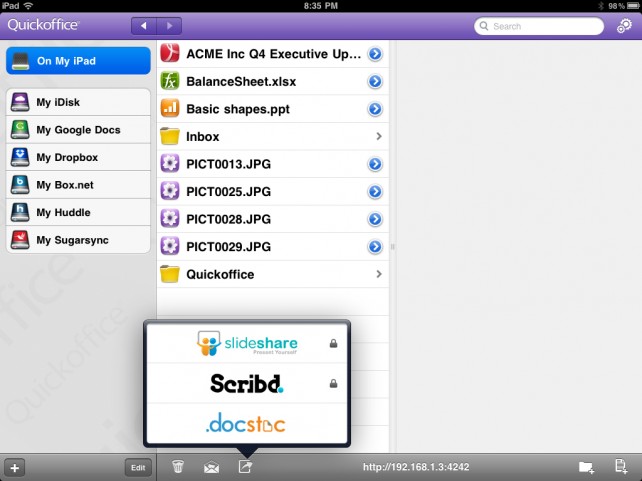
The Quickoffice development team has been hard at work over the past couple of months, especially on the iPad version of Quickoffice Connect Mobile Suite, and it looks as if that will continue throughout 2011. During our recent trip to Macworld, the team was able to show off some of the new document sharing services that they will be adding to Quickoffice Connect Mobile Suite for iPad.
As its name alludes, Quickoffice Connect Mobile Suite isn’t just about document editing and creation. Sure, it supports a wide variety of document formats, but where it really sets itself apart from the pack is with its ‘Connect’ partners. The app already allows you to save and share your documents through a variety of cloud services, like Box.net, Google Docs, Huddle, MobileMe, Dropbox, and SugarSync, but the company is looking to expand their lineup even further.
The next update to Quickoffice Connect Mobile Suite for iPad will feature integration with real-time collaboration services, offering a new way to quickly share important documents with your coworkers. The new services will include Scribd, SlideShare, and Docstoc. You will be able to upload files to these new services using a simple drag and drop system, just like you are already able to with the current set of cloud-based services.
The update will hopefully be available in the near future, and we will be sure to let you know when it hits the App Store.
Quickoffice Connect Mobile Suite for iPad is available in the App Store for $14.99.
Subscribe to:
Posts (Atom)